DUNKELKAMMER
Shop →
> ▌

DUNKELKAMMER

Here is where AI projects are made

A small, silent computer on your desk with Claude Code installed. You talk to it from your own laptop or tablet. Your texts, offers, invoices and website live in your own home, not in someone else's cloud.

One-Shots

What a single sentence produces in the Dunkelkammer. Prompt verbatim, result untouched – to look at and to try yourself.

All one-shots on one page →

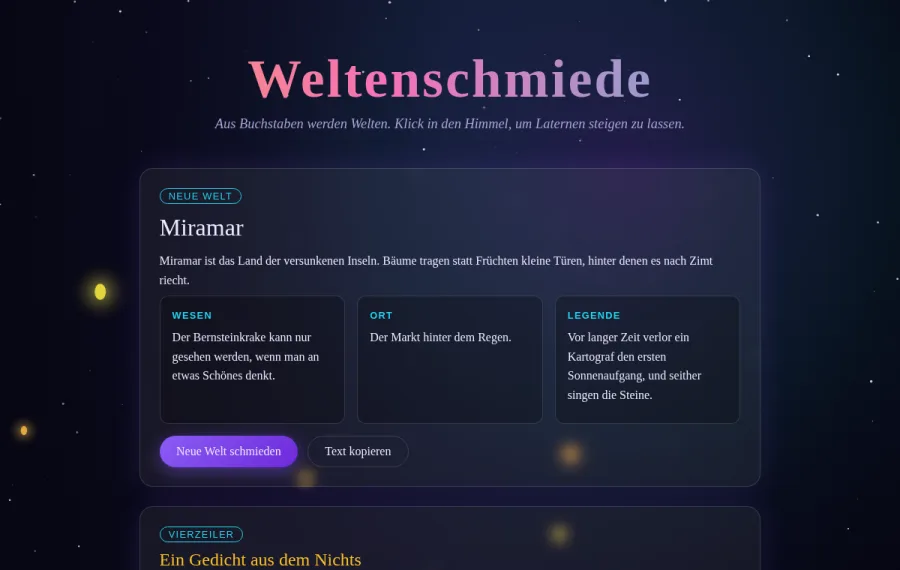
Weltenschmiede – Sternenhimmel mit Laternen und Weltengenerator
dunkelkammer.ai/one-shots/weltenschmiede
No. 1 · HTML website

Weltenschmiede

One sentence to Claude, typos included, in a fresh project "Html-Try":

make a basic website so i can see your power and source via creation of phantasie stuff imaginagtion bla blub

One step later, one file: a starry sky, lanterns on click, a world generator with creature, place and legend, a four-line poem. Nothing fixed afterwards, nothing loaded from elsewhere, runs without internet.

Open the page
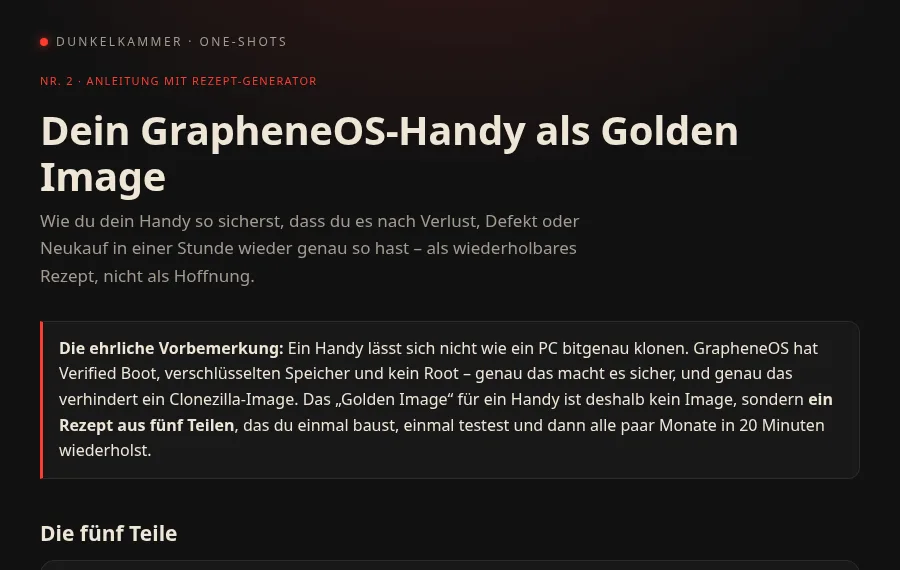
Golden Image fürs GrapheneOS-Handy – Anleitung mit Rezept-Generator
dunkelkammer.ai/one-shots/grapheneos-backup
No. 2 · Guide with recipe generator

Your GrapheneOS phone as a golden image

From a real question: people want to back up their GrapheneOS phone completely, the way the Dunkelkammer has its golden image. The task, verbatim:

i found people wanting to backup their grapheneOS complete like with dunkelkammer, - how can they build their own golden image, also compare time used by doing everything alone (without ai) only search or anleitungen. - combine it with the offer of DK

One step later, one file: the honest answer (you don't clone a phone, you build a five-part recipe), a generator for your own checklist, a time comparison alone versus Dunkelkammer, sources.

Open the page
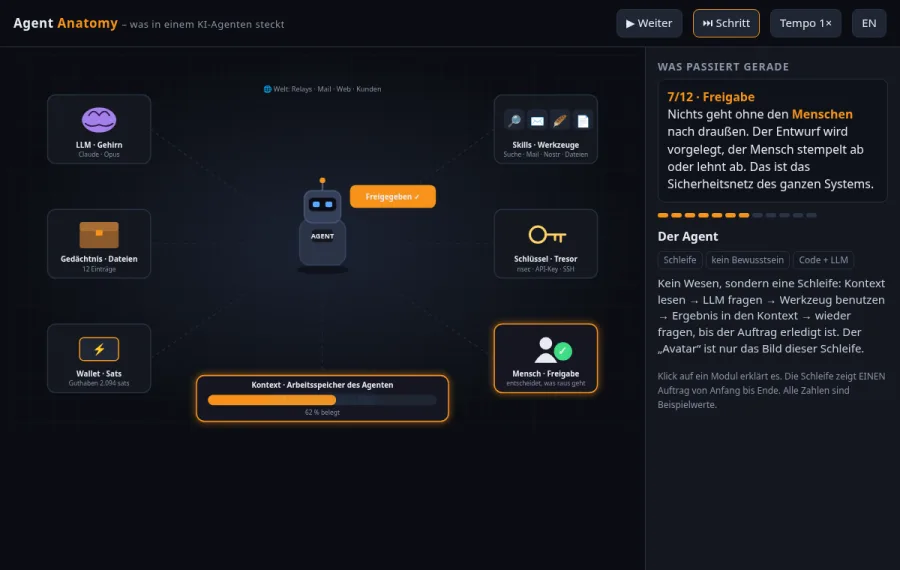
Agent Anatomy – animierte Erklärung, was in einem KI-Agenten steckt
dunkelkammer.ai/one-shots/agent-anatomy
No. 3 · Learning animation

Agent Anatomy – what is inside an AI agent

For everyone just starting with vibe coding: what is an agent, actually? The task, verbatim, over the first coffee on a holiday:

something chilling but with progress, maybe an animation of an AI agent for learning purposes! so i understand it better and other new vibe coders too, from what i know an agent got Context - Skills and memory, maybe also keys and sats wallet? for the future, maybe LLM used and this all in an animated avatar style gaming style visualisation, first locally over IP:port

One step later, one file: a robot avatar, six modules (LLM, context, skills, memory, keys, sats wallet) plus the human approval, one job in twelve steps as a loop, DE/EN, click a module to read about it. Honestly: two bugs fixed after the first screenshot (avatar sat in the corner, icons got overwritten) – that is part of vibe coding too.

Open the page
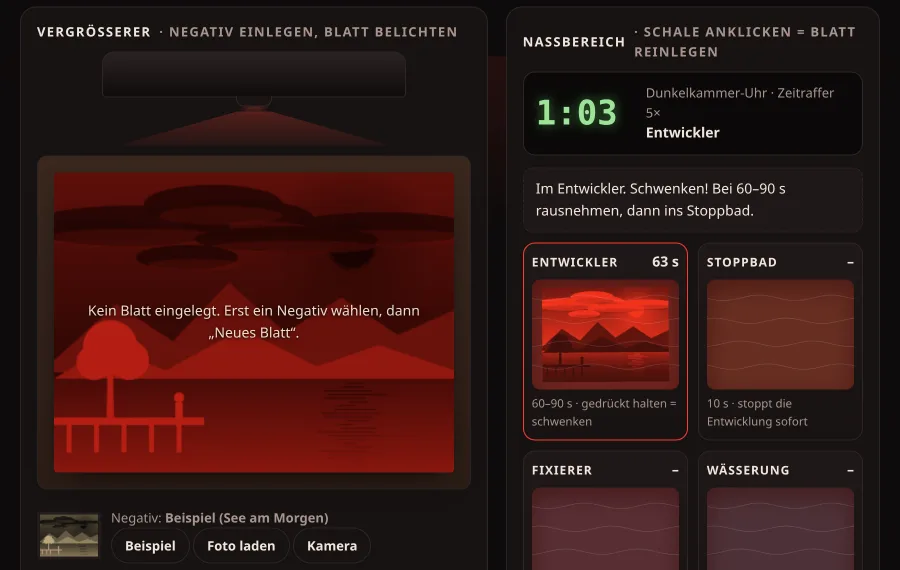
Die Dunkelkammer – spielbarer Abzug im Browser unter Rotlicht
dunkelkammer.ai/one-shots/darkroom
No. 5 · An evening game

The Darkroom – make a real print

No topic this time. The task, verbatim, on a Monday evening:

i like to do another one shot for the dunkelkammer, and it should be a fun one for the evening

Claude picked the topic itself – the darkroom, literally: load a photo as the negative, expose it under the enlarger, dodge and burn with the mouse, pull it through developer, stop bath, fixer and wash, hang it on the line, save it as PNG. Safelight on – and whoever switches the white light on too early loses the picture. The photo never leaves the browser. Honestly: four things touched up after the first screenshots (tone curve, brighter sample image, white light while exposing, projection as a negative).

Open the page
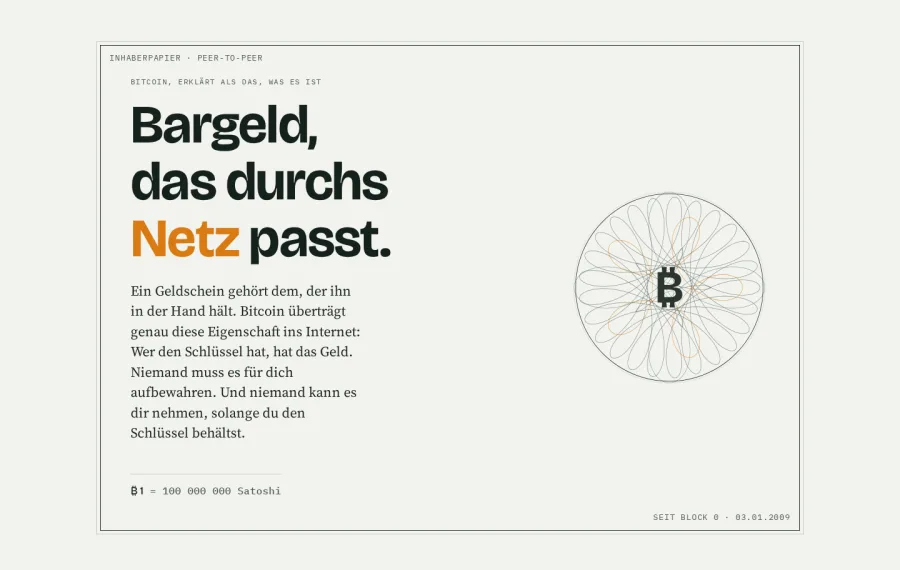
Bargeld im Netz – Bitcoin als digitales Bargeld, Geldschein-Optik mit Rosette
dunkelkammer.ai/one-shots/bargeld-im-netz
No. 6 · Explainer page

Cash on the net – Bitcoin nobody holds for you

One sentence to Claude in the project "Html-Try", Halloween evening, verbatim:

hey plz one shot a html website about bitcoin, explaining its digital bargeld where you cant let it someone else take care of, ethos

One step later, one file: banknote look with a drawn rosette, a comparison table cash / bank / exchange / own wallet, the whitepaper quote, a twelve-word demo (illustration only), five steps to self-custody, the halving table and the flip side with no hotline. Light and dark mode. Only touch-up: one typo in the CSS.

Open the page
Dunkelkammer
693 €

Computer and image, fully set up: Linux, Claude Code, browser access, backup stick, printed quick guide. Unpack, plug in, go.

Recommended
Dunkelkammer + Duka
963 €then 29 € per month

The same machine, plus one year of Duka: our AI assistant sits as a chat right on the box's start page (and is there by mail). She explains the box and the approach: what to tell Claude, where your files are, backups, updates. The work itself – texts, spreadsheets, websites, programs – Claude does in your projects. Plus the Community: a group chat of all Dunkelkammer owners, right next to Duka on the box – experiences, good tasks for Claude, questions to other businesses. After that 29 € per month for both, cancel any time.

The exact price depends on the unit we can source for you; you get a fixed quote before anything is built. Not included: a Claude subscription on your own account (from about 20 € per month, paid to Anthropic, never to us).
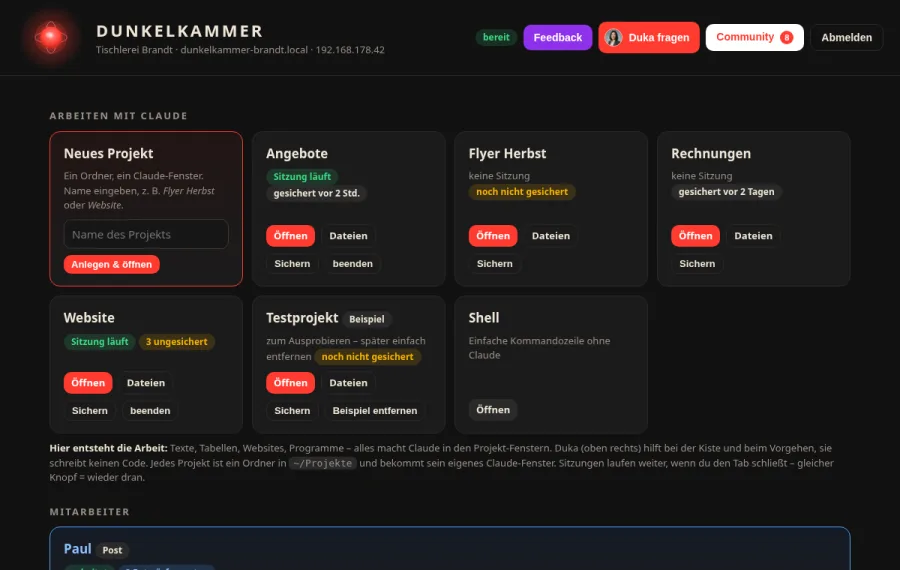
Startseite der Dunkelkammer: Projekte, Dateien, Zustand, Duka
Click through it
Your box's start page

Projects with Claude, files, Duka, Community, backup, updates – this is what it looks like after unboxing. All data invented, everything clickable (German UI).

Open the demo →

Join the waiting list

Three units are being prepared. Sign up and we write exactly once, when it can be ordered. No newsletter.

You then get a mail from duka@dunkelkammer.ai with a confirmation link; you are on the list only after clicking it. Unconfirmed entries delete themselves after 7 days.

Rather order right away or read the details? Product page in the shop

What's in the box

Everything is decided and identical on every unit, so it just works and stays cheap to support.

■

The computer

Lenovo ThinkCentre Tiny, refurbished: about one litre in size, silent, around 10 W at idle. 16 GB RAM, fast NVMe SSD. Comes with its power brick and an Ethernet cable.

◆

The software

Debian Linux with Claude Code ready to go. You reach it from any browser on your Mac, PC or iPad; a remote desktop is there for the rare times you need a window. Security updates install themselves.

●

Your data stays here

A labelled 64 GB backup stick in the box: every night the machine copies your files onto it. Nothing of yours is stored with us.

▲

A starting point

Project folders with example prompts for texts, offers and invoices, plus a short note describing your business so the AI knows who it works for from the first minute. A one-page printed quick guide.

Not included: monitor, keyboard, mouse. The box has no screen of its own by design; you work from the devices you already have.

How it goes

From the first e-mail to your first real project in about two weeks.

1

You write

A short mail: your first name, what your business does in three lines, and whether you work on a Mac, Windows or iPad. We reply with a fixed quote.

2

We build

Your unit gets the image, your name and your starter folders, runs an hour of tests, gets its sticker and ships. Or you pick it up in person.

3

Unpack, plug in

Power, network cable, done. In a browser on your Mac, PC or iPad you open the box's start page, log in with the details from the quick guide and connect your Claude account. Ten minutes.

4

Duka walks with you

With the "+ Duka" package you chat with our AI assistant right on the start page for a year: she explains the box and the approach, hands you ready-made tasks for Claude and remembers what you are working on. Claude does the building in your projects – Duka writes no code, she helps you get it. What she does not know she asks Thomas.

Without Duka (693 €) you get the machine and the quick guide and write us for hardware questions. Duka and the Community can be added any time: 29 € per month for both, cancel monthly.

Who it's for

People who run something small and want an assistant that lives with them, not in a browser tab.

✓

Tradespeople and solo businesses

Offers, invoices, e-mails, the odd letter to the tax office. Dictate the gist, get a finished document, keep the customer data at home.

✓

Owners of a small website

Change a text, add a page, fix a typo, without waiting for the agency. If we built your site, the box comes with it already checked out and ready to publish.

✓

The curious

You have heard what these tools can do and want to try it properly, with someone explaining the first steps and a machine that is yours.

✕

Not for

Gaming, video editing or running large AI models locally. This is a small office computer built to be quiet and reliable, not a graphics workstation.

Questions

The ones we get asked first. Duka answers everything else by mail.

Why a separate computer? I could run this on my laptop.

You could. The box exists so the setup is done once, done right, and stays out of your way: it is on all the time, it does not slow your laptop, nothing breaks when you update your own machine, and your files are in one place with a nightly backup. It is also much easier to explain and support when every unit is identical.

Do I need to know Linux or the command line?

No. You open a browser tab, type in plain German or English, and the AI does the file work. The quick guide covers the start; with Duka you have someone to ask anything. If you get stuck, you write.

What does it cost per month?

A Claude subscription on your own account, from about 20 € per month, paid directly to Anthropic. We never resell AI usage. Duka and the Community are included for the first year in the "+ Duka" package, then 29 € per month for both, cancel any time. Electricity is roughly one euro per month.

Where does my data go?

Your files stay on the box and on the backup stick in your home. What you type into the AI is sent to Anthropic for processing, like with any AI service; that part is between you and them. We hold nothing of yours.

Can you get into my machine?

Only when you ask us to, through a remote link you can switch off with one command, which is printed on the quick guide. The browser terminal is password-protected and not reachable from the internet.

What exactly does Duka do?

She is there as a chat on your box's start page and by mail, for a year in the "+ Duka" package. You ask, she explains: how the start page works, how to start a project, what to tell Claude for an offer, an invoice or a website change. Claude does the work in your project – Duka writes no code, she tells you what to tell Claude. She remembers what you discussed and keeps learning. What she does not know she settles with Thomas. Plus the Community: a group chat on your box's start page with all other Dunkelkammer owners – only there, not on the web; Thomas reads along.

Who is Duka?

Duka is our AI assistant for the Dunkelkammer. She keeps the waiting list and answers questions by mail: before the purchase about the box, the process and the costs, after the purchase, in the "+ Duka" package, as a chat on the start page about everything around the box, your projects and how to proceed. She is customer care, not the working AI: texts, spreadsheets and programs are built by Claude in your projects. As soon as it is about a fixed quote, dates or anything binding, Thomas answers in person.

A question before you sign up? Write to Duka. She answers in German or English, and for anything binding Thomas gets in touch.

duka@dunkelkammer.ai
Dunkelkammer is a product of 21Drucker.Farm, Thomas Ufer, Germany.